
Configure Authentication Method
Configure Authentication Method
In Step 2, you select and configure the authentication method required by the third-party platform (e.g., OAuth 2.0, API Key, Basic Auth). This configuration defines how Item DI obtains and refreshes tokens for authorized API access.
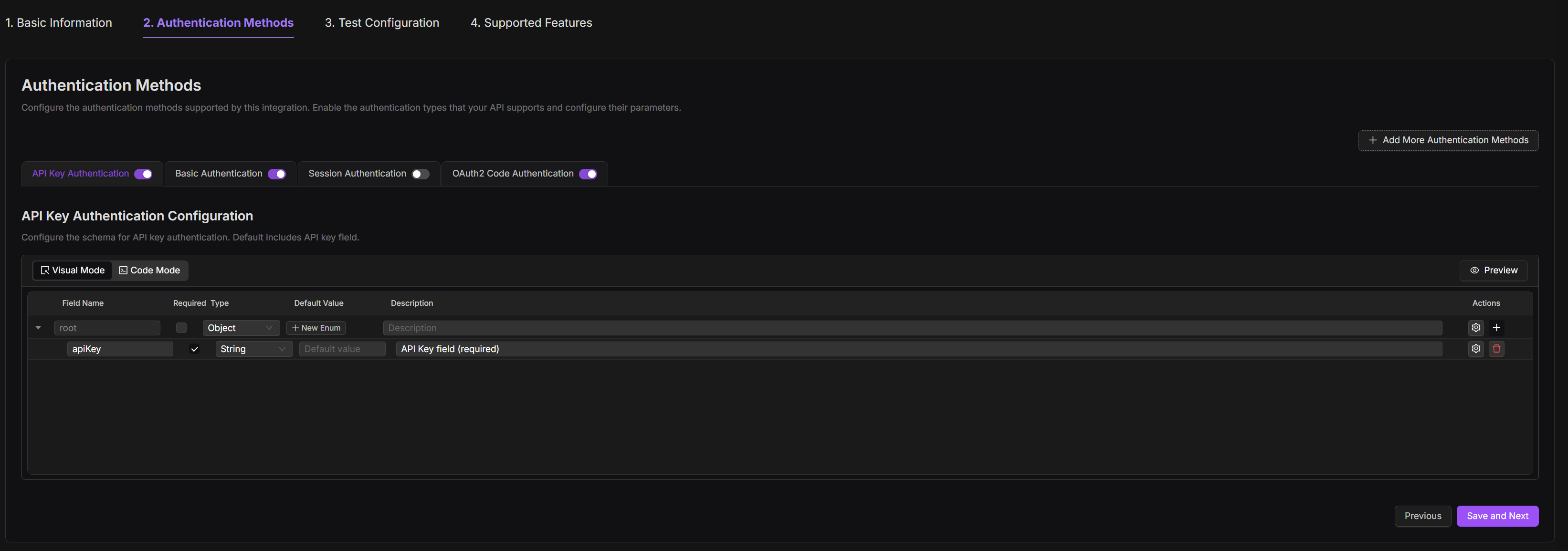
To configure the auth method:
1. Choose the Auth Method that matches the platform’s requirements. 2. Provide the required credentials and parameters based on the selected method.
Auth Method | Required Fields | Behavior |
|---|---|---|
API Key | API key | Token passed in headers or query parameters |
Basic Auth | Username and password | Sends credentials as base64-encoded HTTP header |
Session Auth | Login URL<br> Session cookie/header name | Logs in once and reuses session cookie or header |
OAuth 2.0 Code | Client ID<br> Client Secret<br> Redirect URI<br> Auth URL<br> Token URL<br> Refresh URL | Standard OAuth flow with user consent |
OAuth 2.0 Client | Client ID<br> Client Secret<br>Token URL | Server-to-server token exchange (no user interaction) |
OAuth 2.0 Refresh | Refresh URL<br> Refresh Token<br> Headers | Exchanges long-lived refresh token for new access token |
The system automatically pre-fills default fields such as Auth URLs, token methods, and header structures based on the selected authentication type. Developers only need to confirm and customize values such as Client ID, API key, or specific query parameters.
3. If the platform requires additional input (e.g. region, sellerid, customerid), enable JSON Schema to define these variables as dynamic values used in token or refresh requests.

4. Each authentication method has a different configuration flow beyond the basic setup. Below are use cases that illustrate how to configure specific platforms:
Shopify Integration
Typical OAuth 2.0 Code Flow
5. Complete the setup and click Save and Next.
OAuth 2 Code Example
Besides of the basic configuration, the following tables show how to configure a standard OAuth 2.0 Code authentication flow in Item DI.
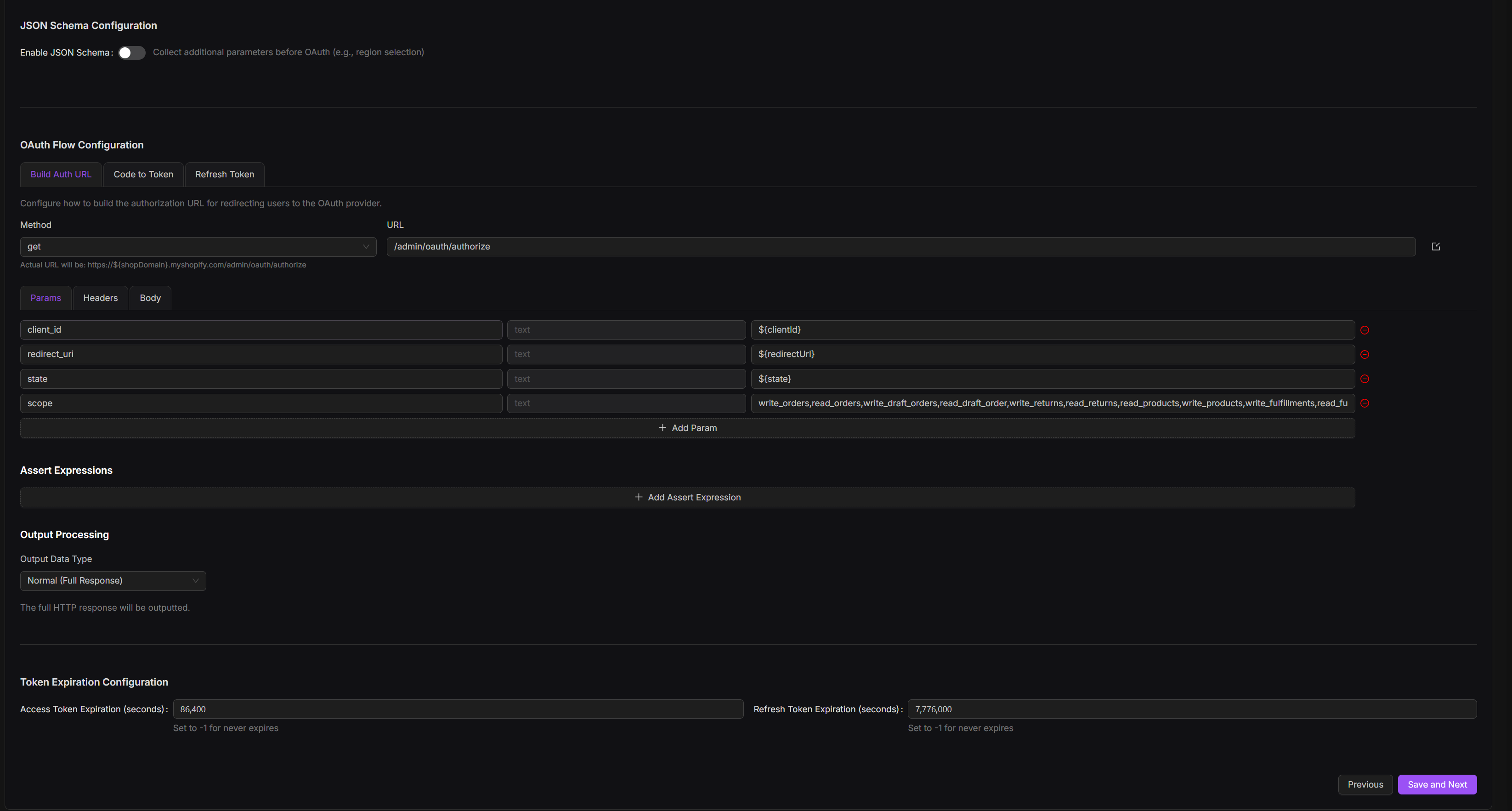
Build Authorization URL
Config | Description | Developer Action |
|---|---|---|
Auth URL | OAuth consent endpoint from the platform | Enter URL from platform docs |
Method | HTTP request method | Typically GET |
Parameters | Required query parameters (e.g. clientid, redirecturi, scope) | Define as key-value pairs |
Assert Expression | Validate redirect contains auth code | Set assert: query.code exists |
Output Processing | extract code from redirect URL | query.code |
Code to Token Exchange
Config | Description | Developer Action |
|---|---|---|
Token URL | Endpoint to exchange code for tokens | From platform docs |
Method | HTTP method | Typically POST |
Body Parameters | Parameters for token exchange (e.g. granttype, code, redirecturi) | Map from platform requirements |
Headers | Token request headers (e.g. Authorization) | As required (often Basic with client credentials) |
Assert Expression | Ensure token is returned | Check HTTP 200 and $.accesstoken` |
Output Processing | Extract tokens from JSON body | $.accesstoken, $.refreshtoken |
Token Expiration | Define how long the token is valid | Enter a fixed number (in seconds) |
Refresh Token Configuration
Config | Description | Developer Action |
|---|---|---|
Refresh URL | Token refresh endpoint | Often same as token URL |
Method | HTTP method | Typically POST |
Body Parameters | Fields like granttype=refreshtoken, refreshtoken` | From docs |
Headers | Headers for refresh request | Usually same as token request |
Assert Expression | Ensure token refreshed | HTTP 200 and $.accesstoken` |
Output Processing | Extract new token values | Use: $.accesstoken, $.refreshtoken |
Token Expiration | Track new expiration time | Enter a fixed number (in seconds) |