
Settings
Settings
To ensure a successful order shipment process, please complete the following settings in advance:
Shipments Settings
Set Up Carrier: Set up preferred carriers and shipping accounts to enable direct shipment handling.
Address Validation: Ensure accurate address validation to reduce delivery errors.
Add Ship From Address: Specify the primary warehouse or location from which shipments will originate.
Customize Shipping Packages: Preset standard package sizes and weights for label creating use to streamline packing and optimize shipping costs.
Connect Printers: Link shipping label printers for easy, fast printing of labels and documents.
Billing Management: Check your balance and manage billing based on your current plan.
Email Settings
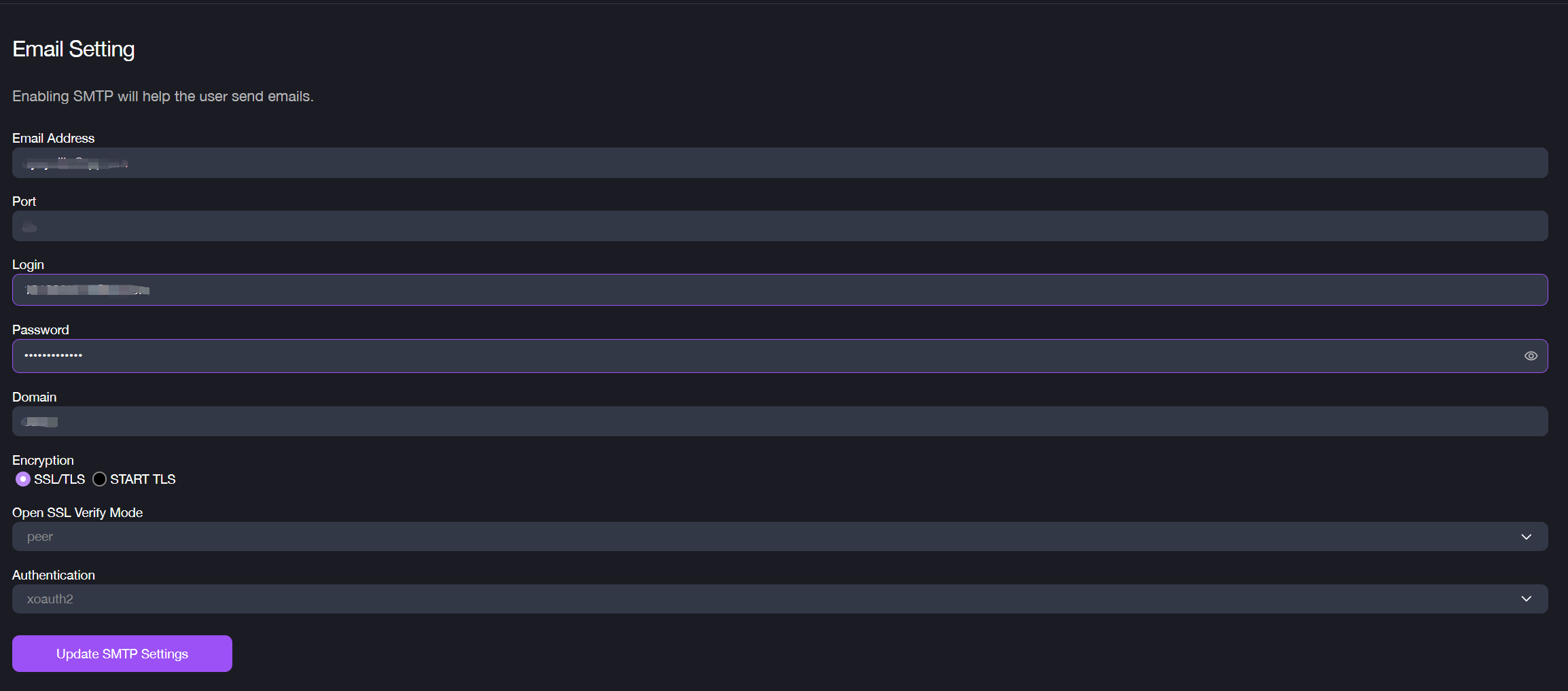
SMTP stands for Simple Mail Transfer Protocol. Enabling SMTP to send emails. This setting is mainly used for issuing purchase orders (PO) to vendors via emails.
To set up SMTP configuration:
1. Navigate to Settings > Email Setting. 2. Enter the Email Address that will appear as the sender when sending POs to vendors. 3. Enter the Port based on the encryption method (587 for TLS, 465 for SSL). 4. Enter your Login account and the Password. 5. Specify the SMTP server’s Domain or IP address and select the level of encryption (SSL/TLS, START TLS). 6. Set OpenSSL Verify Mode to peer and choose an Authentication type from the drop down. 7. Click the Update SMTP Settings button to complete the set-up.