
Location
Location
Overview
This Location module provides a centralized interface for managing all physical locations within the warehouse. These locations are not limited to storage areas but also include various operational points such as pick stations, drop-off points, buffer zones, and more.
This module allows users to:
1. View and search locations by various structural or functional attributes
2. Add new locations with detailed configuration
3. Edit or update existing location details
4. Delete unused or invalid locations
Search & View Location
Users can perform targeted queries using the following filter, these filters support both exact and partial matching to facilitate flexible searches.
Filter Field | Description |
|---|---|
Name | Location name or location pattern. |
Type | The business type for location, including Storage, Pick, and Drop. |
Status | Current location status. Value: Available, Reserved, Occupied. |
Aisle | Aisle identifier (e.g., row in the warehouse) |
Bay | Bay identifier (typically column in the rack) |
Level | Rack level of the location |
Slot | Slot or position within the bay/level |
The results will be shown on the location list, displaying key details for each location entry, such as Status, Name. Each row in the list supports actions such as edit or delete, accessible via icons.
Add New Location
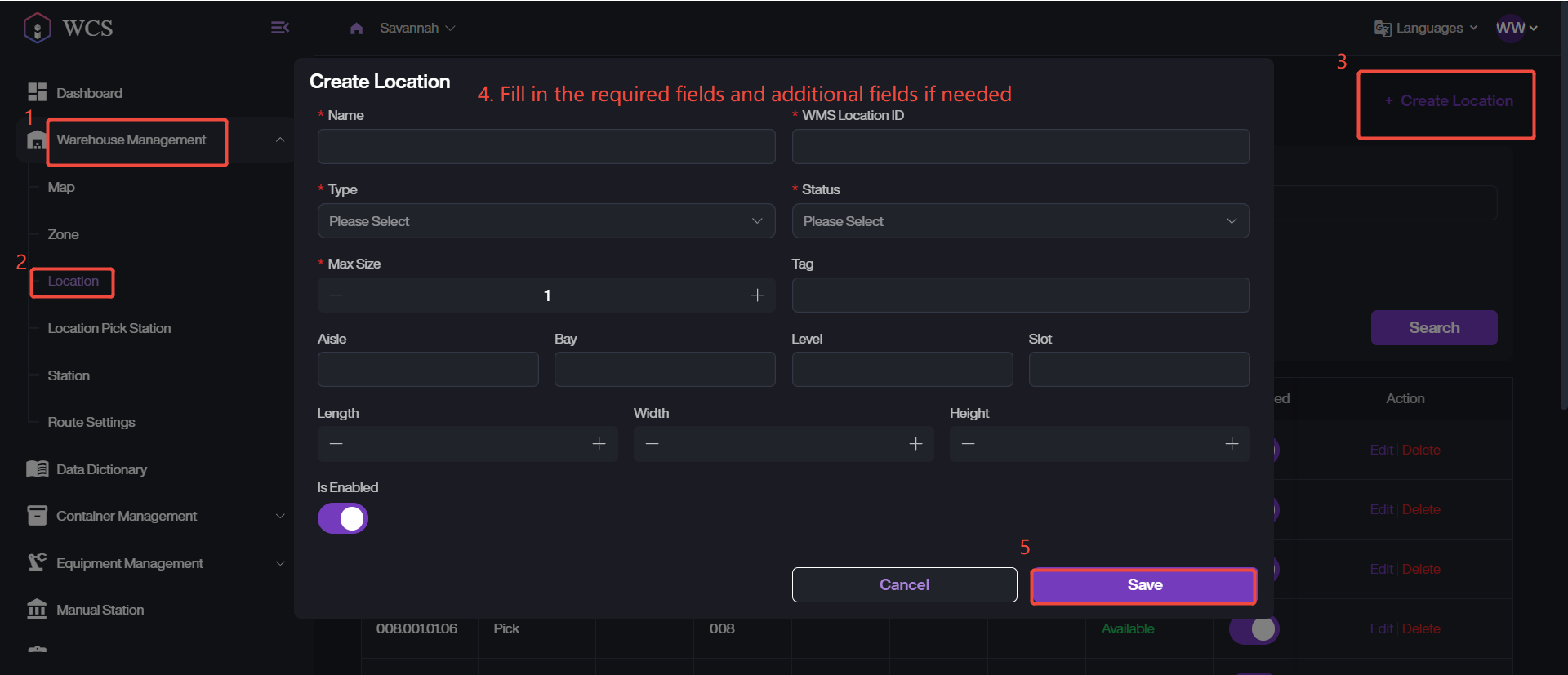
1. Navigate to Warehouse Management > Location, click + Create Location.
2. Fill in all required fields: Name, WMS Location ID, Type, Status, and Max Size.
3. Optionally configure other properties such as Aisle, Bay or Length.
4. Click Save to complete the creation.
Edit/Delete Existing Locations
1. Retrieve the target location in the list.
2. Simply click on Delete to remove the location from the list.
3. Click the Edit button.
4. Modify the desired fields.
5. Click Save to apply the changes.